

AI Grounding Explained: Connecting Prompt Templates with Salesforce Data
Introduction
Artificial Intelligence (AI) has evolved from a futuristic concept to a core business enabler, revolutionizing industries with automation, predictive analytics, and intelligent decision-making. However, AI models trained on static datasets often struggle with real-time accuracy, contextual relevance, and business-specific insights. This is where AI grounding comes into play, a technique that enhances AI by anchoring it in live, structured data sources like Salesforce.
Table of Contents
1. Understanding AI Grounding
Definition & Core Concept
AI grounding means connecting AI models to current, organized data sources so they can provide answers that are timely and relevant. Unlike regular AI that only uses what it learned before, grounded AI actively gets and uses data from business systems (like CRM, ERP, databases).
Why Grounding is Essential
Without grounding, AI systems suffer from:
- Generic or outdated outputs – Since they lack access to live business data.
- Hallucinations – Fabricated or incorrect responses due to knowledge gaps.
- Limited personalization – Inability to tailor responses based on customer history or real-time events.
Grounding mitigates these issues by connecting AI to authoritative data streams, ensuring responses are:
✔ Accurate – Pulled from verified sources (e.g., Salesforce records).
✔ Dynamic – Reflects real-time changes (e.g., updated deal stages).
✔ Actionable – Provides business-specific recommendations.
Types of AI Grounding
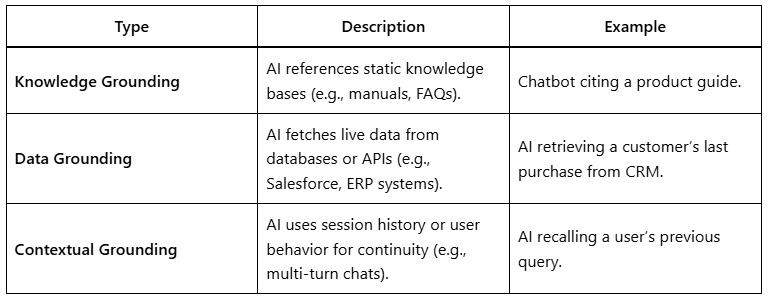
Salesforce grounding primarily falls under data grounding, where AI interacts with CRM data in real time.
2. The Power of Prompt Templates in AI Grounding
What Are Prompt Templates?
Prompt templates are structured input formats that guide AI models by:
- Defining clear instructions.
- Embedding dynamic variables (placeholders) for real-time data insertion.
- Enforcing consistency in AI outputs.
Anatomy of a Prompt Template
A well-designed template includes:
- Static Instructions – Fixed guidance for the AI (e.g., “Summarize the following customer data”).
- Dynamic Variables – Placeholders replaced by live data (e.g., [Contact_Name], [Last_Activity_Date]).
- Context Rules – Logic controlling data retrieval (e.g., “Only include opportunities closed this quarter”).
Example: Salesforce-Grounded Prompt
Template:
“Generate a sales update for [Contact_Name]. Their current opportunity stage is [Opportunity_Stage], and the deal amount is [Amount]. Recommend next steps based on their engagement history.”
Grounded Output (after fetching Salesforce data):
“For John Smith, whose opportunity ‘Enterprise Deal’ is in ‘Negotiation’ ($50,000), recommend sending a personalized demo and discount offer. Last contact was 5 days ago.”
Why Prompt Templates Improve AI
- Reduce Ambiguity – Structured prompts minimize vague or off-topic responses.
- Enforce Business Logic – Ensure AI adheres to company workflows (e.g., sales stages).
- Enable Automation – Auto-generate reports, emails, or alerts from CRM data.
3. Salesforce as a Grounding Data Source
Why Salesforce?
Salesforce is the world’s leading CRM, housing:
- Customer profiles (contacts, accounts).
- Sales pipelines (opportunities, leads).
- Service histories (cases, resolutions).
- Marketing interactions (campaigns, emails).
Integrating AI with Salesforce unlocks:
✅ Personalized customer engagement (e.g., chatbots with purchase history).
✅ Real-time sales insights (e.g., AI forecasting based on live pipeline).
✅ Automated workflows (e.g., AI updating records or triggering alerts).
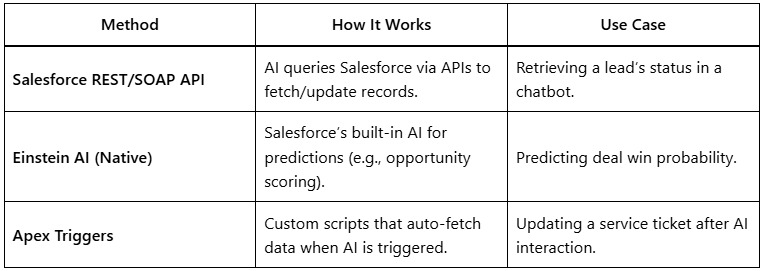
Methods to Ground AI in Salesforce
Step-by-Step Integration
- Identify Key Data Fields – Determine which Salesforce objects/fields AI needs (e.g., Contact.LastActivityDate).
- Design Secure Access – Use OAuth 2.0 and field-level security to protect data.
- Build Prompt Templates – Create dynamic prompts with Salesforce variables.
- Test & Optimize – Validate AI outputs against real CRM data.
4. Business Benefits & Real-World Use Cases
1. Sales Acceleration
- AI-Powered Deal Insights – Grounded AI analyzes Salesforce opportunities to recommend next steps (e.g., “Contact this lead; they opened your email twice”).
- Automated Proposal Generation – AI drafts contracts using CRM data (e.g., pricing tiers, client history).
2. Customer Service Transformation
- Smart Chatbots – AI resolves queries by pulling case status, order history, or SLA deadlines from Salesforce.
- Proactive Support – AI detects trending issues (e.g., a spike in cases for a product) and alerts teams.
3. Marketing Personalization
- Dynamic Content Creation – AI generates tailored emails using Salesforce campaign data (e.g., “Hi [First_Name], your recent download of [Asset_Name] suggests you’d like…”).
4. Executive Decision-Making
- Real-Time Dashboards – AI grounds reports in live Salesforce data (e.g., “Q3 revenue is trending 12% below forecast due to stalled opportunities in Europe”).
5. Challenges & Mitigation Strategies
1. Data Quality Issues
- Problem: Dirty or incomplete Salesforce data leads to flawed AI outputs.
- Solution: Enforce data hygiene with validation rules and deduplication tools.
2. API Latency
- Problem: Slow API responses delay AI interactions.
- Solution: Cache frequently used data or use bulk APIs for batch processing.
3. Over-Reliance on AI
- Problem: Teams may trust AI-generated insights without verification.
- Solution: Implement human-in-the-loop reviews for critical decisions.
My Takeaway: Connecting Prompt Templates with Salesforce Data
AI grounding bridges the gap between static prompt templates and dynamic Salesforce data, enabling more context-aware and intelligent responses. By connecting prompts with real-time CRM records, businesses can deliver personalized customer experiences and automate smarter workflows. This integration not only enhances AI accuracy but also maximizes the value of Salesforce data.